
Find your first Band workout
Start in Workouts. Choose a routine, review the exercise list and equipment, then start when you are ready. You can pause whenever you need more time.
By Band team
Published 1 min read
Practical guidance from the Band team.
Choose a workout
The workout library shows duration and difficulty before you open a routine. Use search and filters to narrow the list, or save a favorite to return to it later.
- Look at the duration and difficulty.
- Open the workout to see the exercises and rounds.
- Check that you have the equipment and space for every movement.
Know what is coming
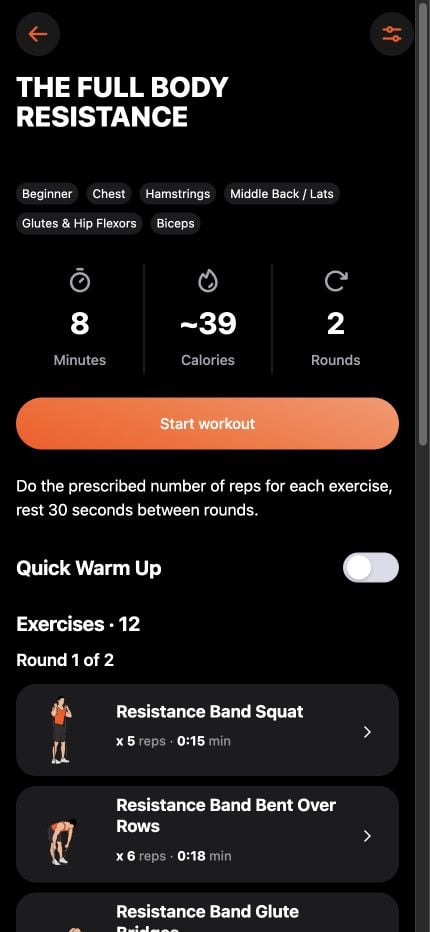
The workout preview brings together the exercise order, repetitions or time, and muscle groups. Tap an exercise to read its instructions before starting.
Follow at your own pace
Start the workout when you are ready. The player provides timing and voice cues. Pause for more time, and adjust the session to what feels manageable today.
Built-in workouts and timers work offline after installation. Check your workout and sound settings before going offline.
Before you train
Choose an amount of exercise that suits your current ability. Stop for pain, dizziness, or unusual breathlessness. If an injury or health condition affects exercise, seek advice from a qualified health professional.
Your next session starts here.
Take what you learn into BAND with guided workouts, interval timers, and voice cues.
Keep learning
Training guides3 min read
Resistance bands for beginners: start with your setup
Learn how to identify your resistance band, preview exercises, and choose your first guided workout in Band.
Equipment3 min read
Loop vs. tube resistance bands: which setup fits you?
Compare long loops, mini loops, and tube bands with handles, then find real Band exercise demonstrations for your setup.
Equipment3 min read
Build a home gym with resistance bands
Plan a compact resistance band workout space, check equipment requirements, and choose exercises for the setup you actually own.
Training evidence3 min read
Do resistance bands build muscle? What the evidence says
Understand the evidence for resistance bands, the difference between strength and muscle growth, and practical ways to structure training.